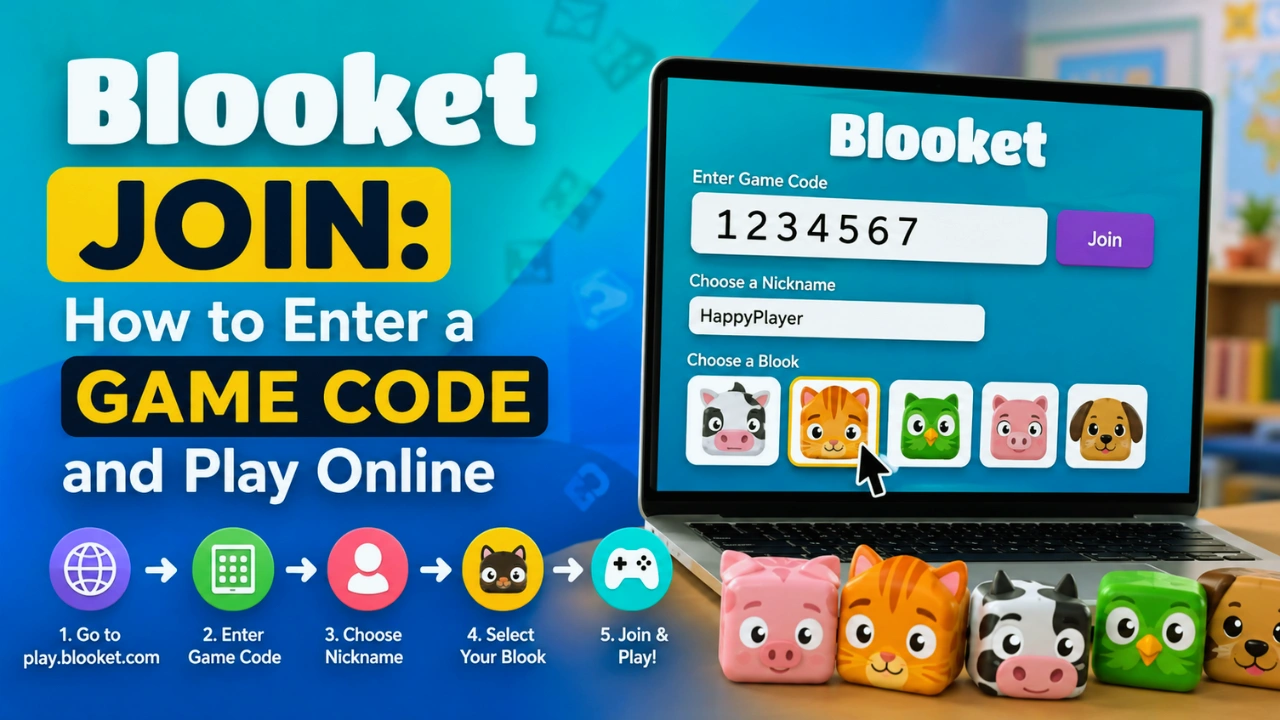
Blooket Join: How to Enter a Game Code and Play Online
Joining a Blooket game is usually much faster than students expect. In most classroom situations, you only need one thing: a valid Blooket join code from your teacher or game host.
The process is simple: open the correct joining page, enter the game code, choose your nickname, select your Blook character, and wait for the game to begin.
However, many students run into minor issues such as entering the code on the wrong page, using an expired code, or wondering whether they need an account (see is Blooket safe for kids for student privacy details). This guide and our comprehensive Blooket guide explain everything about Blooket Join, including how codes work, troubleshooting steps, mobile access, and common questions.
Quick Answer
To join a Blooket game, visit play.blooket.com, enter the game code provided by your teacher, choose a nickname, select your Blook character, and wait for the host to start. You do not need an account for most live games, but an account helps save progress and unlock rewards.
How to Join Blooket Using a Game Code?
Joining a Blooket game takes only a few steps.
Step 1: Open the Blooket Join Website
Start by opening:
play.blooket.com
This page is specifically designed for students joining live games.
A common mistake is visiting the main Blooket website instead. The main website is mainly used for creating accounts, hosting games, and exploring features.
If you see a login page asking for email and password, you are probably on the wrong page.
Step 2: Enter Your Blooket Join Code
Your teacher, host, or instructor will provide a numeric game code.
This code is generated when a host starts a live Blooket session.
A Blooket code:
- Works only for one specific game session
- Is created automatically
- Usually expires after the game ends
- Cannot be reused for future games
Enter the numbers carefully and click the join button.
Step 3: Choose Your Nickname
After entering the code, Blooket will ask you to select a nickname.
Your nickname is visible to:
- Your teacher
- Other players
- The leaderboard
Many classrooms require students to use their real names so teachers can identify participants easily.
Avoid using inappropriate usernames because hosts can remove players from the game.
Step 4: Select Your Blook
A Blook is your character or avatar inside the game.
Choosing a Blook is mostly cosmetic. It usually does not provide any extra advantages during gameplay.
You can choose a character based on your preference and then enter the waiting area.
Do You Need a Blooket Account to Join?
No, students usually do not need a Blooket account to join a live classroom game.
You can participate using only:
- A browser
- A working internet connection
- A valid Blooket code
However, creating an account provides additional benefits.
| Without Account | With Account |
|---|---|
| Join live games | Join games |
| Play as guest | Save progress |
| Limited rewards | Collect tokens |
| Temporary experience | Unlock Blooks |
For a quick classroom activity, joining as a guest is enough. For regular players, an account provides a better experience.
Where Can You Find a Blooket Join Code?
The game host normally provides a Blooket code.
In a Classroom
Teachers usually display the code on:
- Classroom projector
- Smart board
- Whiteboard
- Shared screen
Students copy the numbers and enter them.
During Online Classes
For remote learning, teachers may share codes through:
- Google Classroom
- Microsoft Teams
- Zoom chat
- School learning platforms
Some teachers also share direct joining links that automatically open the game.
For Homework Games
Homework assignments work slightly differently.
Instead of entering a live game code, students usually receive a direct link from their teacher.
Clicking the link opens the assigned Blooket activity.
Why Is My Blooket Code Not Working?
If your Blooket join code is not working, check these common issues.
1. The Game Has Already Started
Some Blooket games stop accepting new players once the host begins.
Solution:
Ask your teacher to create a new session or allow late joining.
2. The Code Has Expired
Blooket codes are temporary.
A code from:
- Yesterday’s class
- An old assignment
- A previous game
will usually not work.
You need a fresh code from the host.
3. You Entered the Code on the Wrong Website
Many users accidentally enter codes on the main Blooket website.
Correct joining page:
play.blooket.com
The joining page asks only for a game code.
4. The Code Was Typed Incorrectly
Since codes are numbers, mistakes happen easily.
Common errors include:
- Missing digits
- Switching numbers
- Confusing similar-looking numbers
Ask the host to repeat the code if needed.
Can You Join Blooket on a Phone?
Yes, Blooket works on mobile browsers.
Students can join using:
- Smartphones
- Tablets
- Chromebooks
- Laptops
- Desktop computers
No special application is required.
For simple quiz modes, mobile devices work well. However, some advanced Blooket game modes may feel easier on larger screens because they include more controls and visual elements.
What Happens After You Join a Blooket Game?
After joining successfully, you enter the game lobby.
You will usually see:
- Your nickname
- Your selected Blook
- Other players
- Waiting status
The host controls when the game begins.
Once started, gameplay depends on the selected Blooket mode.
Different modes may include:
- Answering questions
- Collecting rewards
- Competing against classmates
- Managing resources
- Building strategies
Each game mode creates a different learning experience.
Blooket Join vs Blooket Homework Mode
| Feature | Live Game | Homework Mode |
|---|---|---|
| Requires code | Yes | Usually no |
| Host controls start | Yes | No |
| Real-time competition | Yes | No |
| Flexible completion | Limited | Yes |
| Common use | Classroom activities | Assignments |
Teachers choose between these options depending on their learning goals.
Tips for Joining Blooket Faster
Follow these simple tips:
Save the Correct Website
Bookmark:
play.blooket.com
This avoids confusion during class.
Check Your Internet Connection
A weak connection can prevent joining or loading the game.
Enter Codes Carefully
Double-check every number before submitting.
Use a Suitable Device
For advanced modes, a laptop or tablet may provide a better experience.
Common Mistakes Students Make When Joining Blooket
Using the Wrong Website
The most common mistake is opening the teacher dashboard instead of the student joining page.
Using Old Codes
Every live session has a unique code.
Creating Random Nicknames
Teachers may remove players who cannot be identified.
Refreshing Too Many Times
Repeated refreshing can sometimes create connection issues.
Expert Recommendation: Best Way to Use Blooket in Classrooms
Teachers should share clear joining instructions before starting a game.
A simple classroom process works best:
- Display the code clearly
- Tell students the correct website
- Allow time for everyone to join
- Explain the game rules
- Start the session
This reduces confusion and helps students focus on learning rather than technical problems.
FAQ
What is a Blooket join code?
A Blooket join code is a temporary numeric code created by a host when starting a live game. Students use this code on play.blooket.com to enter the classroom activity.
Do I need an account to join Blooket?
No, you can join most live Blooket games without creating an account. However, an account allows you to save progress, collect rewards, and unlock additional Blooks.
Where do I enter my Blooket code?
Enter your Blooket code at play.blooket.com. This page is designed specifically for students joining live games.
Why does my Blooket code say invalid?
A Blooket code may show as invalid if the session has ended, the code was entered incorrectly, or you are using the wrong joining page.
Can I join Blooket from my phone?
Yes. Blooket works through mobile browsers, so you can join games using smartphones and tablets without downloading an app.
Can I join a Blooket game after it starts?
It depends on the settings chosen by the host. Some games allow late joining, while others require students to join before the game begins.
Are Blooket codes reusable?
No. Each Blooket code belongs to a specific game session and normally expires after that session ends.
Is Blooket free for students?
Yes. Students can join classroom games for free using a valid game code provided by a host.

Table of Contents